Title: How to Create a Google Drive Direct Download Link – A Step‑by‑Step Guide (2024)

—
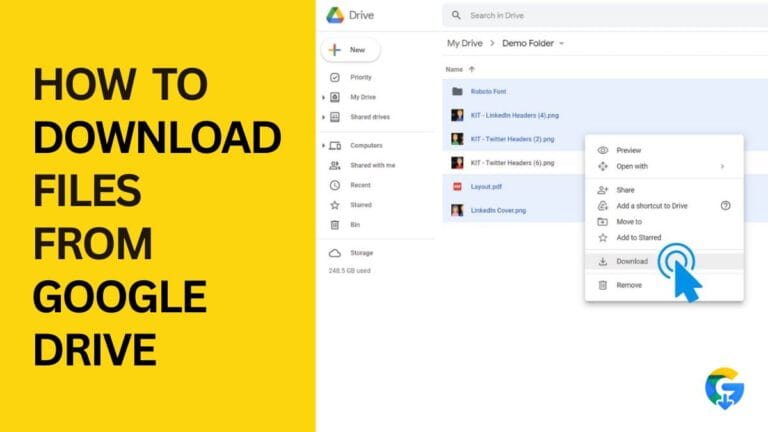
Introduction: Why a Direct Download Link Matters
Ever tried to share a large PDF, video, or software installer via Google Drive, only to watch the recipient wrestle with the “Preview” screen, click “Download,” and then stare at a loading bar that seems to go nowhere? That extra click (or two) can be frustrating, especially when you’re sending time‑sensitive resources, marketing assets, or product updates.
A Google Drive direct download link eliminates the middle‑man preview step and forces the file to start downloading instantly. It’s the perfect solution for:
- Distributing digital products or e‑books without a landing page.
- Sharing large media files with teammates who need quick access.
- Embedding files in blogs, forums, or email newsletters where a one‑click download is expected.
- Use a URL shortener that caches the file (e.g., Bitly with a “Redirect” option).
- Split the file into smaller parts (ZIP archives) before uploading.
- Consider Google Cloud Storage for high‑traffic assets; it offers more robust bandwidth limits and signed URLs.
- Add a short note next to the link: “Large file (150 MB) – Google will show a safety warning before download.”
- Provide a checksum (MD5 or SHA‑256) so users can verify the file after download.
- Use expiration dates (via Google Workspace’s “Link expiration” feature) for temporary assets.
- Rotate links periodically for sensitive files.
- Adding referrer checks on a server‑side proxy (if you route the download through your own domain).
- Limiting the number of downloads per IP using Google Workspace’s admin console (for enterprise accounts).
- Spread assets across multiple Drive accounts or folders.
- Upgrade to Google Workspace for higher limits and analytics.
In this post, we’ll walk you through everything you need to know about creating, customizing, and safely using Google Drive direct download links. By the end, you’ll have a toolbox of actionable techniques that work for any file type—whether you’re a marketer, educator, or casual user.
—
1. Understanding Google Drive Share Links vs. Direct Download Links
1.1 The default share link
When you click “Get shareable link” in Google Drive, the platform generates a URL that looks like this:
“`
https://drive.google.com/file/d/1A2b3C4d5E6f7G8h9I0j/view?usp=sharing
“`
This link opens a Google‑hosted preview page. The user can view the file in the browser, then click the Download button.
1.2 What makes a link “direct”?
A direct download link bypasses the preview UI and sends the file straight to the browser’s download manager. The key is swapping the /view endpoint for /uc?export=download (or a similar parameter). The resulting URL looks like:
“`
https://drive.google.com/uc?export=download&id=1A2b3C4d5E6f7G8h9I0j
“`
When a user clicks this link, the file starts downloading automatically—no extra clicks, no preview, no “Google Drive can’t scan this file for viruses” warnings (unless the file exceeds Google’s 100 MB virus‑scan limit).
1.3 When to use each type
| Situation | Recommended Link | Reason |
|———–|——————|——–|
| Public marketing assets (e‑books, whitepapers) | Direct download | One‑click conversion, smoother UX |
| Collaborative documents (Google Docs, Sheets) | Share link | Recipients may need to edit or comment |
| Large video files (> 100 MB) | Direct download (with caution) | Faster access, but watch for bandwidth caps |
| Sensitive internal files | Share link with restricted permissions | Extra layer of access control |
—
2. How to Generate a Google Drive Direct Download Link – The Basics
2.1 Step‑by‑step for a single file
1. Upload the file to Google Drive (or locate an existing file).
2. Right‑click the file → “Get link.”
3. In the sharing dialog, set “Anyone with the link” to Viewer (or Restricted if you’ll add the direct link to a private page). Click Copy link.
4. Extract the file ID from the copied URL. The ID is the long alphanumeric string between `/d/` and `/view`. Example:
“`
https://drive.google.com/file/d/1A2b3C4d5E6f7G8h9I0j/view?usp=sharing
^^^^^^^^^^^^^^^^^^^^^^^^^^^^^^ <– ID
“`
5. Build the direct link using the following template:
“`
https://drive.google.com/uc?export=download&id=FILE_ID
“`
Replace `FILE_ID` with the string you extracted.
6. Test the link in an incognito window to confirm the file downloads instantly.
2.2 Bulk‑generation for multiple files (using Google Apps Script)
If you need direct links for dozens of assets, manually copying IDs becomes tedious. A quick Google Apps Script can automate the process:
“`javascript
function generateDirectLinks() {
var folderId = ‘YOURFOLDERID’; // folder containing the files
var folder = DriveApp.getFolderById(folderId);
var files = folder.getFiles();
var output = [];
while (files.hasNext()) {
var file = files.next();
var id = file.getId();
var name = file.getName();
var directLink = ‘https://drive.google.com/uc?export=download&id=’ + id;
output.push([name, directLink]);
}
// Create a new spreadsheet with the results
var ss = SpreadsheetApp.create(‘Direct Download Links’);
ss.getActiveSheet().getRange(1,1,output.length,2).setValues(output);
}
“`
Run the script from Extensions → Apps Script in Google Sheets. The script creates a new spreadsheet with two columns—File Name and Direct Download URL—that you can copy‑paste wherever you need.
2.3 Handling large files (> 100 MB)
Google Drive adds a “download quota exceeded” warning for files that exceed a certain bandwidth threshold. To avoid this:
—
3. Advanced Tricks: Customizing Direct Download Behavior
3.1 Forcing a specific file name
Sometimes the downloaded file inherits a generic name like “download.” To set a custom name, add the `&filename=` parameter:
“`
https://drive.google.com/uc?export=download&id=FILEID&filename=MyEbook.pdf
“`
Most browsers respect this query string, but note that some older browsers may ignore it.
3.2 Bypassing the “Google Drive can’t scan this file for viruses” warning
When a file is larger than 100 MB, Google shows a warning page before the download starts. While you can’t remove the warning entirely (it’s a security feature), you can pre‑emptively inform users:
3.3 Embedding direct download links in HTML
If you’re building a landing page, use the `` tag with the `download` attribute for better UX:
“`html
📥 Download My e‑Book Now
“`
The `download` attribute hints to the browser that the link is a direct download, reinforcing the expected behavior.
3.4 Using Google Drive API for programmatic access
For developers who need to generate direct links on the fly (e.g., in a SaaS product), the Google Drive API provides an endpoint:
“`
GET https://www.googleapis.com/drive/v3/files/FILE_ID?alt=media
Authorization: Bearer YOURACCESSTOKEN
“`
The response streams the file content directly, allowing you to serve it through your own domain while still storing it in Drive. This approach also lets you enforce authentication, rate‑limit usage, and log downloads.
—
4. Best Practices & Security Considerations
4.1 Keep permissions tight
Even though a direct link looks “public,” it respects the underlying file’s sharing settings. If the file is set to “Anyone with the link can view,” anyone who discovers the URL can download it.
4.2 Avoid hotlinking from untrusted sites
If you embed a direct download link on a public forum, bots may scrape the URL, causing unexpected bandwidth consumption. Mitigate by:
4.3 Monitor quota and usage
Google Drive imposes a download quota of roughly 750 GB per day per file for free accounts. If you exceed this, the file will return a “download quota exceeded” error for 24 hours. To stay safe:
4.4 Provide fallback options
Always include an alternative download method (e.g., a secondary mirror or a “Contact us for the file” link). This ensures that users aren’t stuck if Google’s quota blocks the file.
—
5. Real‑World Use Cases: How Professionals Leverage Direct Links
| Use Case | Implementation Tips |
|———-|———————-|
| E‑book distribution for lead magnets | Host the PDF in Drive, set “Anyone with the link can view,” generate the direct link, embed with a CTA button on your landing page. |
| Software releases for a small startup | Zip the installer, add a checksum file, create a direct link, and share it in a GitHub release notes. Use link expiration after the launch week. |
| Classroom resources for teachers | Upload worksheets, generate direct links, embed them in Google Classroom assignments. Set permissions to “Anyone with the link can view” for easy student access. |
| Internal SOPs for remote teams | Store SOP PDFs in a shared Drive folder, generate direct links, and add them to the company wiki. Keep the folder restricted to the organization. |
| Media assets for bloggers | Upload high‑resolution images, create direct download links, and use them in downloadable resource packs. Include the `filename=` parameter for clean file names. |
—
Conclusion: Key Takeaways
1. Direct download links replace the default preview page with an instant file download, improving user experience and conversion rates.
2. Generating a link is as simple as extracting the file ID and using the `https://drive.google.com/uc?export=download&id=FILE_ID` format. For bulk work, a short Google Apps Script can automate the process.
3. Advanced tweaks—custom filenames, API streaming, and HTML `download` attributes—give you fine‑grained control over how the file is delivered.
4. Security matters: keep sharing permissions appropriate, monitor Google’s download quota, and consider link expiration for sensitive assets.
5. Whether you’re a marketer, educator, or developer, integrating Google Drive direct download links into your workflow can save time, reduce friction, and keep your audience happy.
Ready to streamline your file sharing? Grab that file ID, swap the endpoint, and watch your downloads start automatically—no extra clicks required. Happy sharing!