

Google Docs Downloader
The Google Docs Downloader is a free Google Docs direct download link generator. Paste a shared link and get a direct download URL for PDF, Word (.docx), Markdown, EPUB, ODT, RTF, TXT or HTML. No sign-up and nothing uploaded.
Google Docs Direct Download Link Generator
Set General access to “Anyone with the link” first. Need a test?
Advanced PDF Export Parameters
What is a Google Docs Downloader?
A Google Docs Downloader is a free tool that turns a normal Google Docs link (the one ending in /edit) into a direct export link ending in /export?format=. Opening that link downloads the file at once, so nobody has to open the editor and use File, Download.
This Google Docs direct download link generator also reads Google Sheets and Google Slides links. Use it to send a syllabus as a PDF, share an editable Word template, or pull clean Markdown for a static site.
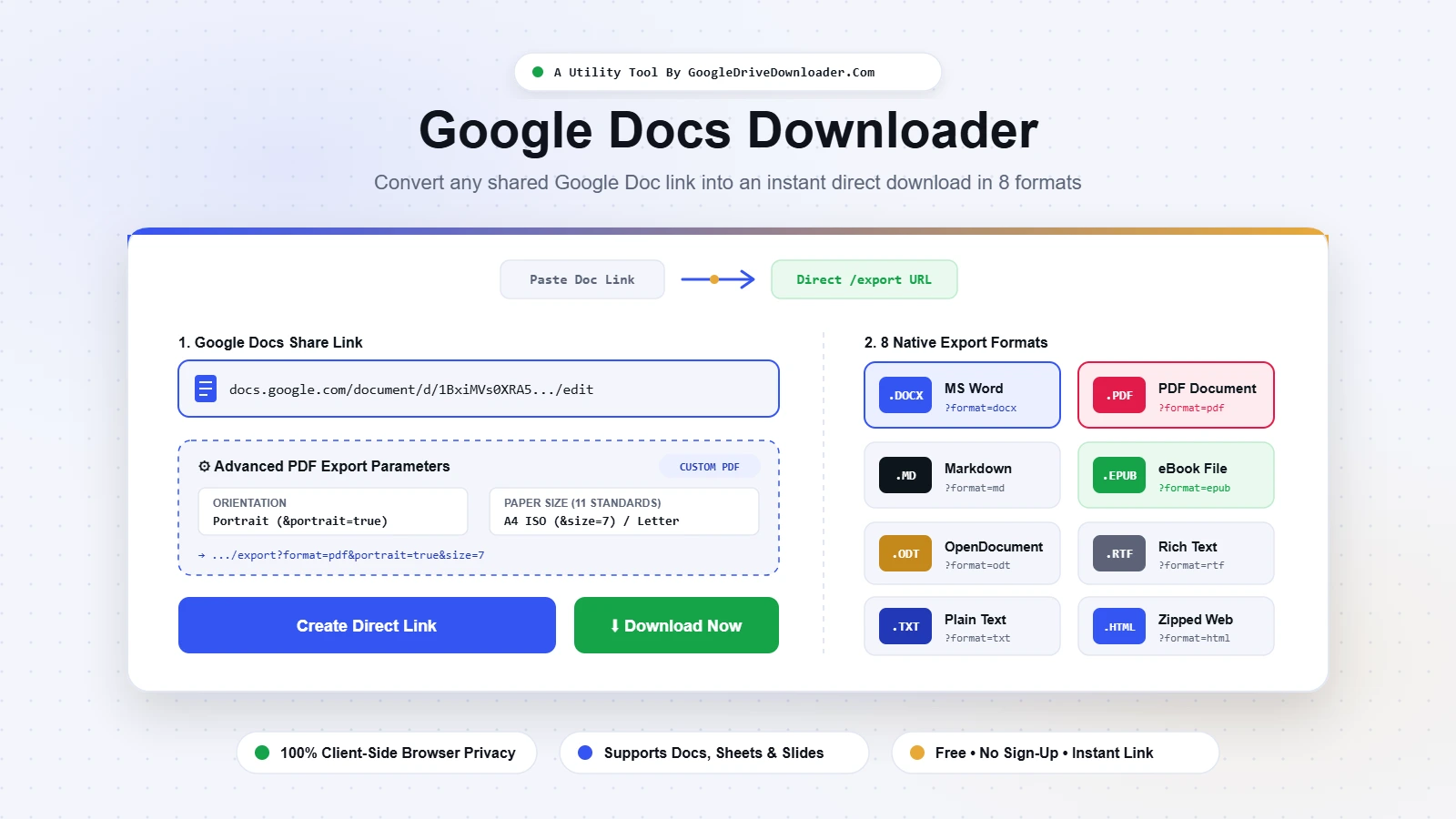
How to use the Google Docs Downloader in 4 steps
- Share your Google DocClick Share, set General access to “Anyone with the link” (Viewer), then Copy link. Google’s sharing guide covers every option.
- Paste the link into the Google Docs DownloaderA full URL or a bare file ID both work. Sheets and Slides links are detected automatically.
- Choose a format and PDF settingsPick DOCX, PDF, Markdown, EPUB, ODT, RTF, TXT or zipped HTML. For PDF, open Advanced PDF Export Settings to set orientation and paper size.
- Download or copy the direct linkClick Create Direct Download Link, then Download Now. You can also copy the URL, an HTML link or a Markdown link for emails, buttons and course pages.
Google Docs direct download link generator: supported formats
Every export link follows one pattern. Replace FILE_ID with your document ID:
https://docs.google.com/document/d/FILE_ID/export?format=docx| Format | URL parameter | Best for |
|---|---|---|
| Word (.docx) | format=docx | Editable business documents |
| PDF (.pdf) | format=pdf | Print-ready, fixed layout |
| Markdown (.md) | format=md | GitHub, Hugo, Jekyll, notes |
| EPUB (.epub) | format=epub | E-readers and phones |
| OpenDocument (.odt) | format=odt | LibreOffice Writer |
| Rich Text (.rtf) | format=rtf | Older word processors |
| Plain Text (.txt) | format=txt | Raw text extraction |
| Web Page (.zip) | format=html | HTML plus original-resolution images |
Google Sheets links export to XLSX, CSV, TSV, ODS, PDF or HTML. Google Slides links export to PPTX, ODP, TXT or PDF. The format list changes when you paste the link.
Export Google Doc to PDF URL: paper size and orientation codes
To export a Google Doc to a PDF URL, end the document link with /export?format=pdf:
https://docs.google.com/document/d/FILE_ID/export?format=pdfGoogle Sheets accepts &portrait=false for landscape and a numeric &size= code for paper size. A Google Doc normally keeps the page setup saved inside the document (File, Page setup), so the tool adds these values but Google may ignore them for Docs.
| Paper size | Code | Dimensions |
|---|---|---|
| Letter | &size=0 | 8.5 x 11 in |
| Tabloid | &size=1 | 11 x 17 in |
| Legal | &size=2 | 8.5 x 14 in |
| Statement | &size=3 | 5.5 x 8.5 in |
| Executive | &size=4 | 7.25 x 10.5 in |
| Folio | &size=5 | 8.5 x 13 in |
| A3 | &size=6 | 297 x 420 mm |
| A4 | &size=7 | 210 x 297 mm |
| A5 | &size=8 | 148 x 210 mm |
| B4 | &size=9 | 250 x 353 mm |
| B5 | &size=10 | 176 x 250 mm |
For Sheets PDFs the tool can also add &fitw=true (fit to width), &gridlines=false and &gid=ID&single=true to export one tab.
Download Google Docs as DOCX without signing in
Anyone can download Google Docs as DOCX without signing in when the owner sets General access to “Anyone with the link”. The export link then opens the file directly. A Restricted document sends visitors to a Google sign-in page, so share it first.
Fixing common Google Docs Downloader errors
| What you see | Likely cause | Fix |
|---|---|---|
| Google sign-in page appears | Sharing is Restricted | Set General access to Anyone with the link |
| File does not exist | Truncated ID or deleted file | Copy the full URL from the address bar |
| Access denied on a shared file | Owner disabled downloads for viewers | Ask the owner to allow download, print and copy |
| Drive file link message | Uploaded .docx, not a native Google Doc | Use the Google Drive Downloader |
| Works for you, fails for others | You are signed in as the owner | Test the link in a private window |
Is this Google Docs Downloader safe and private?
Yes. The tool only rewrites a URL inside your browser. When you click download, your browser fetches the file directly from Google over HTTPS.
We never see your documents or links, and we cannot bypass Google’s permissions. Private files stay private.
Why use this Google Docs Downloader
DOCX, PDF, Markdown, EPUB, ODT, RTF, TXT and zipped HTML.
Orientation, 11 paper sizes and Sheets layout options.
The format list adapts to the link you paste.
Ready-made link snippets for blogs and LMS pages.
Reload your last 5 files from local storage.
No watermark, no daily limit, no upload.
Google Docs Downloader FAQ
What is a Google Docs Downloader?
It is a free Google Docs direct download link generator. It converts a shared Google Docs, Sheets or Slides link into a direct download URL for Word, PDF, Markdown, EPUB, ODT, RTF, TXT or HTML.
How can I download Google Docs as DOCX without signing in?
If the owner set General access to “Anyone with the link”, paste the URL here, choose Microsoft Word (.docx) and download. No Google login is needed.
How do I create an export Google Doc to PDF URL?
End the document URL with /export?format=pdf. The PDF follows the page setup saved in the Doc. For Google Sheets you can also add orientation and paper size codes.
How do I create a direct download link for a Google Doc?
Replace /edit at the end of the shared URL with /export?format=docx (or pdf, md, epub). Or paste the link into the tool above and it builds the URL for you.
Does this tool support Markdown (.md) export?
Yes. The format=md parameter keeps headings, bold, italics, lists and links.
How can I extract all images from a Google Doc?
Choose Web Page (.html, zipped). Google returns a ZIP with the HTML file and an images folder holding every embedded image.
Can I export only some pages?
No. The export endpoint converts the whole document. For a page range, use File, Print, Save as PDF inside Google Docs.
Does it work for Google Sheets and Slides?
Yes. Paste a Sheets or Slides link and the format list changes to match, with PDF available for both.
About this tool
Built and maintained by the GoogleDriveDownloader.com team. The tool uses Google’s own export endpoints, so results match File, Download inside Google Docs.
Last updated: October 31, 2026
Google Docs Downloader is an independent utility and is not affiliated with Google LLC. Google Docs, Sheets, Slides and Drive are trademarks of Google LLC.